
Placing a 65-inch television on a stand that is exactly the same width as the screen is a common mistake that ruins both the visual balance and the structural safety of your living space. To truly anchor your room, the ideal tv stand for 65 inch tv should be at least 60 inches wide, though current 2026 design standards suggest aiming for 70 inches to avoid an awkward overhang. Let’s be frank; a premium screen deserves a foundation that doesn’t just hold the weight but actually enhances your home’s character without compromising your flooring.
We understand the frustration of seeing a beautiful new display look cluttered by tangled wires or the fear that a heavy media unit might leave permanent indentations in your luxury vinyl or hardwood floors. This guide provides the practical steps you need to choose a stand that distributes weight safely while keeping your aesthetic clean. You will learn the exact sizing requirements for modern sets, the best materials for long-term durability, and how to create a polished, cable-free setup that feels both professional and secure.
Key Takeaways
- Understand the difference between diagonal screen size and actual width to ensure your furniture provides a safe, balanced foundation.
- Learn how to select a tv stand for 65 inch tv that distributes weight evenly to prevent indentations on your LVT or wood flooring.
- Compare flush and extended fit styles to find the right aesthetic balance for your specific living room layout.
- Master cable management and ventilation techniques that keep your tech running cool while hiding unsightly wires from view.
- Discover why structural integrity matters for large-format screens and how to spot furniture built for long-term reliability.
Understanding Dimensions: Why a 65-Inch TV Needs a Wider Stand
Buying a new screen is an investment in your home’s comfort, but many homeowners fall into a sizing trap before they even unbox the unit. They assume a 65-inch screen fits perfectly on a 65-inch stand. It doesn’t. If you match these numbers exactly, you’ll find your television hanging over the edges or sitting dangerously close to the rim. To get the setup right, you need to understand how manufacturers actually measure their products and how that translates to your living room floor.
The Diagonal Measurement Myth
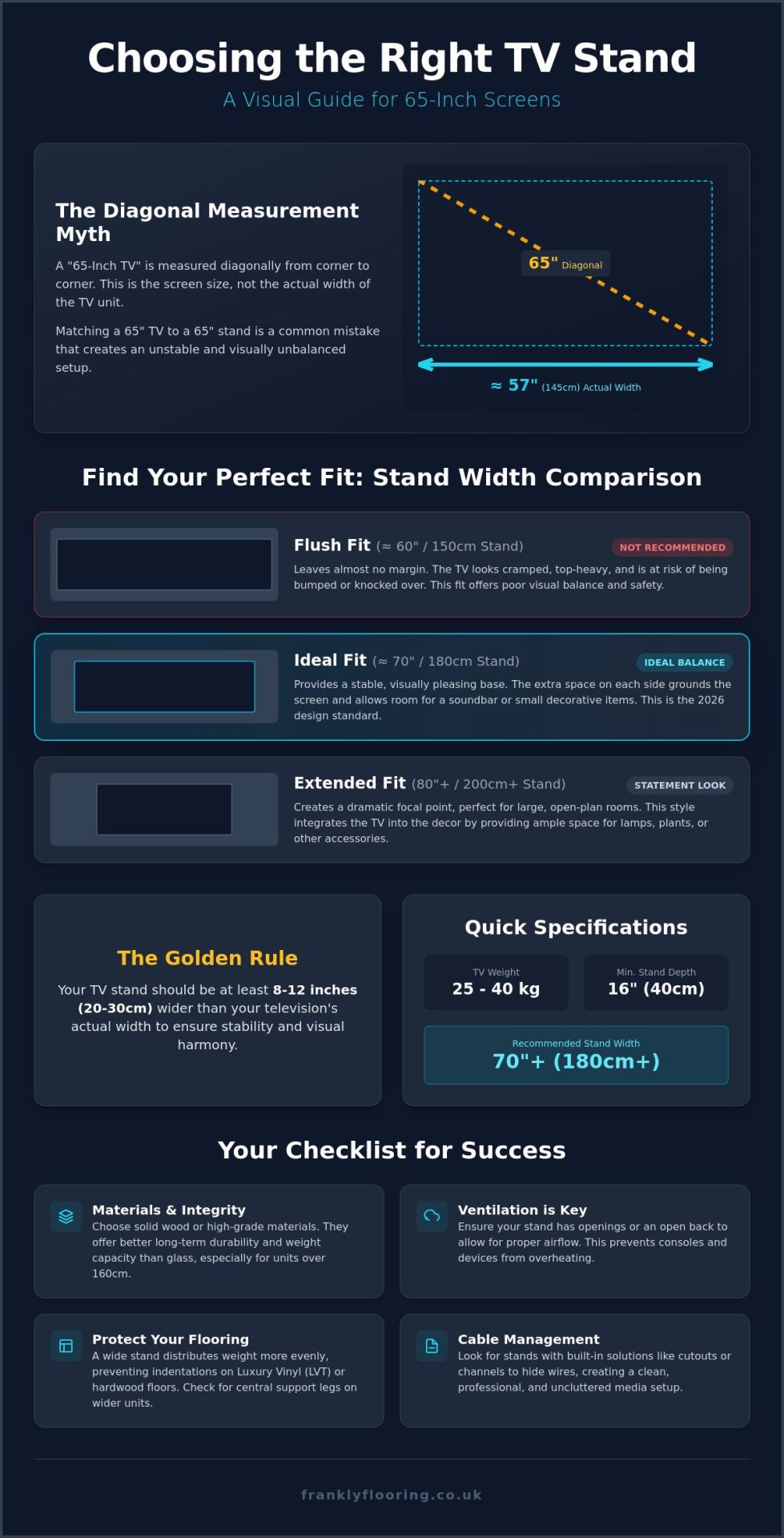
Screen sizes are purely diagonal measurements. When a box says “65 inches,” it refers to the distance from the top-left corner of the glass to the bottom-right. It doesn’t account for the horizontal width or the frame around the screen. In 2026, bezels have become incredibly thin, often less than 5mm, but the actual horizontal width of a 65-inch TV remains roughly 145cm, or 57 inches. To ensure your tv stand for 65 inch tv provides a secure foundation, you have to look at the total footprint.
- Diagonal Screen Size: 65 inches (165cm)
- Actual Horizontal Width: Approximately 57 inches (145cm)
- Minimum Recommended Stand Width: 170cm to 180cm
If you buy a stand that is only 140cm wide, your premium screen will overhang the sides. This isn’t just an eyesore; it’s a safety hazard. Overhanging edges are prone to being bumped by children or pets, which can lead to a costly disaster. We recommend the “Golden Rule”: your stand should be at least 20 to 30cm wider than the TV itself to ensure a stable, centered base that looks intentional rather than accidental.
Visual Balance and the Rule of Thirds
A living room should feel grounded. If your TV is wider than the furniture beneath it, the room feels top-heavy and cramped. Looking back at the history of entertainment centers, these pieces were originally designed to house bulky cathode-ray tubes within massive wooden frames. Today, we have the opposite problem. Screens are huge but thin, requiring a wide, low-profile base to create visual harmony.
Following the rule of thirds helps achieve this balance. By choosing a tv stand for 65 inch tv that extends 10-15cm past the screen on either side, you create space for a soundbar or a few curated accessories. This prevents the “floating screen” effect where the TV seems to overwhelm the wall. Stability also relies on depth. While modern screens are slim, the feet often have a wide footprint. A stand with a depth of at least 40cm ensures the weight is distributed centrally, protecting your furniture and the floor beneath it from unnecessary stress.
Choosing the Right Width: A Comparison for 65-Inch Screens
Finding the right size is about more than just making sure the feet of the TV stay on the surface. It’s about proportion. If you select a unit that’s too small, the screen looks like an afterthought. If it’s too large, it can swallow the entire wall. Most homeowners find themselves choosing between three standard widths for their tv stand for 65 inch tv setup to achieve the right look.
Standard vs Wide TV Units
A 150cm unit is the absolute minimum requirement. Since a 65-inch screen is roughly 145cm wide, this leaves a tiny 2.5cm margin on either side. This “Flush Fit” style works in tight apartments where every millimeter counts, but it leaves no room for error. It’s a functional choice, not a stylistic one. It can often make the television feel cramped and unstable.
The 180cm unit is our ideal recommendation. This size provides approximately 17cm of space on either side of the screen. This extra room is essential if you plan to integrate a home theater system or a high-end soundbar. It creates a balanced look where the furniture feels like a deliberate foundation for the technology. For those with open-plan living areas, a 200cm or larger unit creates a dramatic focal point. These wider stands allow you to place decorative accessories or lamps alongside the screen, helping the tech blend into your home’s decor.
Weight Capacity and Structural Integrity
A tv stand for 65 inch tv must be built to handle significant pressure over many years. Modern 65-inch screens often weigh between 25kg and 40kg, depending on the panel type. While glass stands look sleek, they have strict weight limits that can be compromised by a heavy soundbar or a collection of gaming consoles. Solid wood or high-grade furniture materials offer better longevity and peace of mind.
When choosing a unit over 160cm, always check for central support legs. Without a middle leg, even the sturdiest top can begin to bow under the weight of a large screen. This “sag” doesn’t just look bad; it puts stress on the TV’s internal components. If you’re investing in quality furniture to protect your electronics, it’s also worth considering how that weight affects what’s underneath. You can find a wide range of quality furniture and flooring options that handle these heavy setups without leaving a mark.
Finally, consider the height. Your eyes should naturally rest on the middle of the screen when you’re seated. A stand that is too tall will cause neck strain, while one that is too low feels like you’re looking down into a pit. Aim for a stand height between 45cm and 60cm for the most comfortable viewing experience.
Materials and Flooring: Protecting Your Investment
Choosing a tv stand for 65 inch tv involves more than just matching wood grains to your coffee table. You have to consider the physics of the setup. A large television and a sturdy stand can easily combine to weigh over 60kg. This weight isn’t spread evenly; it’s concentrated on four small points where the legs meet the floor. If you don’t account for this pressure, you risk permanent damage to your home’s foundation. Your choice of material should balance structural integrity with the specific needs of your flooring.
Solid wood stands are the gold standard for durability. They handle the weight of a 65-inch screen without bowing, but they are heavy themselves. Metal frames offer an industrial aesthetic and high weight capacities, though their feet can be sharp. MDF or engineered wood options are lighter and more budget-friendly, yet they require internal reinforcement to prevent sagging over time. Regardless of the material, how you place the unit matters most for the longevity of your room.
TV Stands on Hard Floors: LVT and Wood
Hard surfaces require a cautious approach. When placing heavy furniture on LVT flooring, the primary concern is point loading. High-quality luxury vinyl is resilient, but sustained pressure on a tiny area can cause subtle indentations. To avoid this, look for stands with wide-base legs or a solid plinth. These designs distribute the weight across a larger surface area, reducing the PSI on your floor boards.
For those with engineered wood flooring, scratches are the main enemy. “Drag-and-drop” is a mistake we see too often. Never slide a media unit into place. Even a tiny piece of grit trapped under a leg can act like a diamond-tipped glass cutter on your finish. Always use high-density felt pads on the bottom of every leg. These pads provide a soft buffer and make minor adjustments much safer for the wood’s surface.
Furniture on Carpet: Preventing Permanent Dents
Placing a heavy tv stand for 65 inch tv on a carpet presents a different challenge. Over months or years, the weight crushes the pile, leaving deep “pockmarks” that are difficult to steam out. If you have a deep-pile or Saxony carpet, use furniture cups. These plastic or wooden discs sit under the legs to spread the load. They aren’t always the most stylish accessory, but they are far better than a ruined carpet.
Stability is also a factor on soft surfaces. A heavy unit placed near a wall can cause the carpet to ripple if it isn’t properly secured. Ensuring your carpet gripper is high-quality and correctly fitted will keep the floor tight under the weight. When you eventually decide to move the furniture, lift it vertically. Tearing the carpet backing by dragging a heavy stand is a common, expensive error that is easily avoided with a bit of patience and an extra pair of hands.
Storage and Cable Management for Modern Living
Once you have sorted the dimensions and flooring protection, the next challenge is managing the “technical spaghetti” that comes with a large entertainment setup. A 65-inch screen usually anchors a complex system of soundbars, gaming consoles, and streaming hubs. A standard tv stand for 65 inch tv must do more than just sit there; it needs to act as a command center that hides clutter while keeping your expensive hardware safe from overheating.
Our “Frank” approach to cable routing is simple: use the furniture to hide the infrastructure. Many mass-produced stands feature tiny, circular holes that are barely large enough for a single HDMI lead. We recommend looking for units with wide, rectangular cutouts or recessed back panels. This allows you to position the stand directly over your wall sockets, completely concealing the plugs and wires from view. It is also vital to check that these openings are wide enough to pass a standard UK 3-pin plug through without having to disassemble the furniture.
Ventilation and Tech Safety
Tech in 2026 is more powerful than ever, which means it runs hot. Tucking a high-performance gaming console or a 4K receiver into a sealed wooden cabinet is a recipe for hardware failure. Without proper airflow, heat builds up rapidly, causing fans to spin at maximum speed and eventually triggering thermal shutdowns. To prevent this, choose a stand with an open-back design or adjustable shelving that leaves at least 5cm of “breathing room” above each device. Some modern designs now incorporate slatted fronts or breathable mesh panels. these allow infrared signals from your remote to pass through while keeping the air moving.
Integrating Media Storage
Drawers are the best choice for small items like spare controllers, charging cables, and remotes that otherwise end up lost in sofa cushions. Cupboards are better suited for larger items, but ensure they have adjustable shelves to accommodate the varying heights of modern tech. For those who still cherish physical media, incorporating specialized storage and display items from Legend Vinyl ensures your records are kept in top condition while adding a touch of classic style to your media hub. If you are aiming for a minimalist, “floating” look, remember that the wall fixings must be rated for the combined weight of the unit and the screen.
Your media unit should not feel like an isolated piece of technology. It looks best when it harmonizes with other quality furniture in the room, such as sideboards or coffee tables. By matching materials and heights, you create a cohesive design that feels like a home rather than a showroom. If you are ready to upgrade your entire living space, view our full range of furniture and flooring to find the perfect match for your 2026 home setup.
Making the Right Choice: Quality and Longevity
Don’t be tempted by the lowest price tag when shopping for a tv stand for 65 inch tv. A budget flat-pack unit might look acceptable in a studio-lit photograph, but it often lacks the internal bracing required to support a large-format screen. Over months and years, the constant pressure from a 30kg television causes thin, low-grade MDF to sag. This structural failure doesn’t just look poor; it makes the unit unstable and can cause doors and drawers to jam. Quality furniture is a foundational element of your home’s character and should be built to last as long as the house itself.
Spotting high-quality craftsmanship is easier than you might think if you know where to look. Check the joints and the weight of the panels. Premium units use reinforced fixings rather than simple plastic cam locks. The top surface should feel substantial and thick enough to distribute weight without bowing. Examine the finish as well. A high-quality veneer or solid wood surface will resist the heat generated by your electronics and won’t peel or bubble at the first sign of use. Investing in better materials now prevents the frustration of replacing a flimsy unit in two years’ time.
The “Frank” Value Proposition
We believe in candor. Our approach is built on 20 years of experience as a family-run business, prioritizing integrity over high-pressure sales tactics. We don’t just view a media unit as a commodity; it’s a piece of technical craftsmanship that needs to perform a specific job. Our commitment to British homeowners is to provide no-nonsense advice that prioritizes long-term satisfaction. This means being transparent about material limits and ensuring your selection fits the reality of your living space. We focus on end-to-end satisfaction, guiding you from the initial inspiration to the final home delivery with a steady, reassuring pace.
Final Pre-Purchase Checklist
Before you click “buy” or head to the checkout, run through this final list to ensure your new setup is perfect. A few minutes of double-checking can save you hours of return logistics later.
- Verify the “Actual” Width: As we discussed in section one, confirm the horizontal measurement of your TV model. Don’t rely on the 65-inch diagonal screen size.
- Measure Your Floor Space: Ensure there is at least 60cm of clearance around the stand. You need enough room to move comfortably without brushing against the screen.
- Prepare Your Flooring: Have your felt pads or furniture cups ready. Protecting your LVT, wood, or carpet should happen the second the unit enters the room.
- Check Socket Alignment: Ensure your wall outlets align with the cable management ports on the back of the stand to keep those wires hidden.
Choosing the right furniture is about more than just a style choice. It’s about precision, safety, and creating a balanced environment. By focusing on quality craftsmanship and honest materials, you ensure your living room remains a functional and beautiful space for years to come.
Secure Your Perfect Home Cinema Setup
Choosing the right foundation for your screen is about combining technical precision with your home’s unique style. By focusing on actual horizontal measurements rather than diagonal marketing terms, you ensure your tv stand for 65 inch tv provides the stability your investment requires. Remember that protecting your LVT, wood, or carpet with proper weight distribution is just as vital as hiding messy cables for a clean, professional finish.
At Frankly Flooring, we leverage over 20 years of experience as a family-run business to provide transparent, no-nonsense advice. We prioritize your long-term satisfaction over quick wins, offering national UK delivery to ensure your furniture arrives safely. Our goal is to guide you through a logical journey from initial selection to final home setup with quiet confidence in our technical craftsmanship.
Browse our range of high-quality furniture for your living room to find a piece that matches our high standards for durability and design. With the right preparation and a focus on quality, your new 65-inch television will become a perfectly balanced, secure centerpiece of your home.
Frequently Asked Questions
How wide is a 65-inch TV in cm?
A standard 65-inch TV is approximately 145cm wide. While the diagonal screen measurement is 165cm, the horizontal width is the figure that determines your furniture needs. It is always wise to check your specific model’s manual, as different bezel designs can add a few extra millimeters to the total width.
Can a 65-inch TV fit on a 120cm stand?
No, a 65-inch TV will not fit safely on a 120cm stand because the screen will overhang by about 12.5cm on each side. This creates a significant tipping hazard and looks poorly proportioned. You should select a unit that is at least 150cm wide to ensure the screen is fully supported and visually grounded.
How much weight can a standard TV unit hold?
Most high-quality TV units are built to support between 30kg and 70kg. Solid wood and metal-framed pieces generally occupy the higher end of this scale, whereas basic flat-pack furniture might only be rated for 35kg. Always check the maximum load capacity before placement to prevent the top surface from bowing or collapsing over time.
Should a TV stand be wider than the TV?
Yes, your tv stand for 65 inch tv should be wider than the screen to ensure both physical stability and aesthetic balance. We recommend a stand that extends at least 10cm to 15cm beyond the edges of the television. This extra width prevents the setup from looking top-heavy and protects the screen corners from accidental bumps.
How do I protect my LVT floor from a heavy TV stand?
Protecting LVT flooring requires distributing the weight of the furniture using high-density felt pads or wide furniture cups. Avoid stands with narrow, sharp legs that concentrate pressure on a tiny area. Choosing a unit with a solid plinth base or broad wooden feet is the best way to prevent permanent indentations on your luxury vinyl.
What is the best height for a TV stand for a 65-inch TV?
The ideal height for a tv stand for 65 inch tv is typically between 45cm and 60cm. You want the center of the screen to sit at eye level when you are seated on your sofa. This height provides the most comfortable viewing angle and helps reduce neck strain during long periods of use.
Do I need a special stand for a curved 65-inch TV?
You don’t need a specialized stand, but you must pay close attention to the depth of the furniture. Curved televisions often have a larger footprint than flat panels, with feet that may sit further back or forward. Ensure your stand has a depth of at least 45cm so the screen remains stable and centered without any part of the base overhanging.
Can I put a 65-inch TV on a corner TV unit?
You can use a corner unit, but you must ensure the stand is wide enough to prevent the TV edges from hitting the walls. Most corner units are designed for smaller displays, so a 65-inch screen may end up sitting quite far forward. Measure the distance from the corner to the front of the stand to confirm the screen will actually fit in the space.