
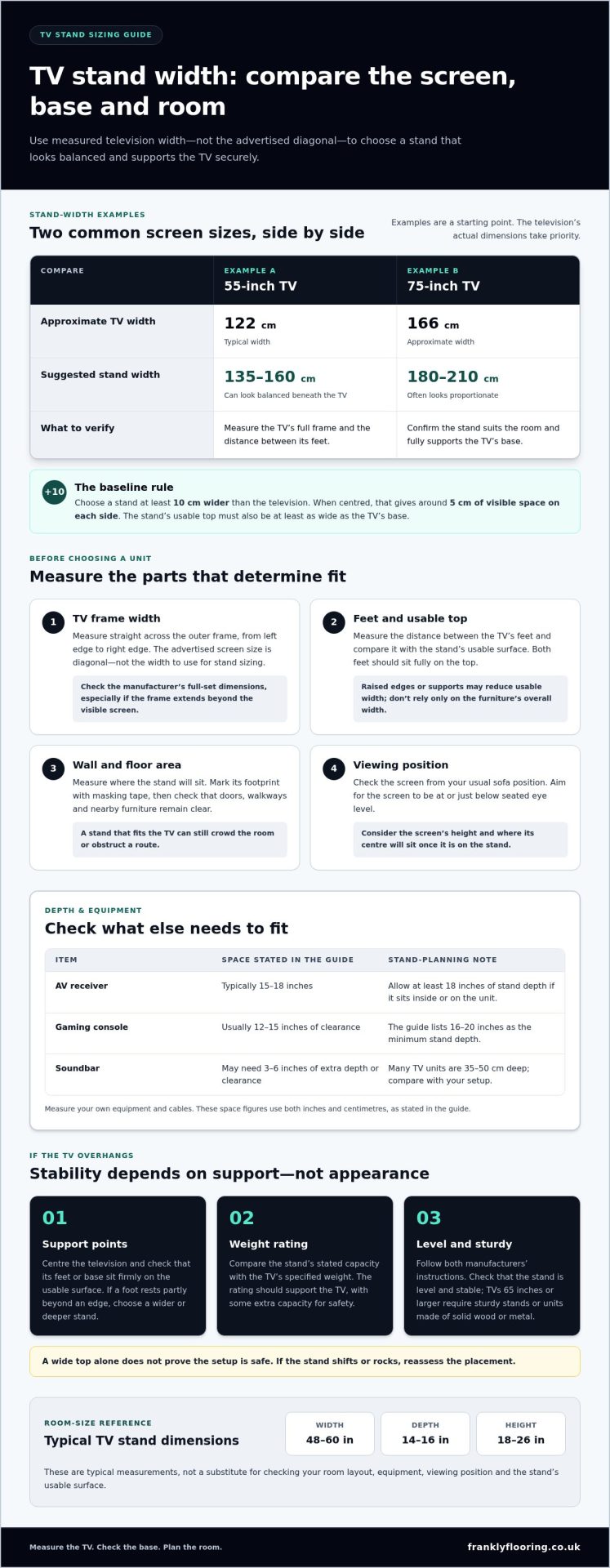
A TV stand should be at least 10 cm wider than your television. If you’re working out what size TV stand you need, measure the screen’s actual width rather than relying on its advertised size, which refers to the diagonal.
It’s easy to focus on matching the stand to the TV, but the room matters just as much. A unit that looks right on its own may crowd a small living room, while a compact stand can feel out of proportion beneath a large screen. This guide explains how to choose what size TV stand you need, assess the available space and check stability if the TV overhangs, so you can find a fit that works in your home.
Key Takeaways
- Measure the screen’s width and its feet or base, then compare those dimensions with the stand’s usable surface.
- Plan for the room as well as the TV: account for walkways, nearby furniture and the space needed for accessories.
- If the screen overhangs, assess whether its base sits securely and whether the stand’s weight rating and instructions support the setup.
- Choose a stand that feels proportionate to your room, with a compact footprint for tighter spaces and a wider unit where the layout allows.
What Size TV Stand or TV Unit Do I Need for My TV?
For a balanced fit, choose a stand at least 10 cm wider than the television. Measure the screen and base, then check viewing height and the space available in your room before buying.
-
Measure the Television’s Actual Width
Measure straight across the television’s outer frame, from its left edge to its right edge. The advertised size describes the diagonal screen measurement, not its width: a 50-inch television is measured diagonally, so don’t use 50 inches as the stand-width figure. Check the manufacturer’s dimensions for the full set, especially if its frame extends beyond the visible screen. Record the width in centimetres to compare it with UK furniture measurements.
-
Compare the Stand With the TV Screen and Base
Compare the stand’s usable top width with both the television’s full width and the distance between its feet. A stand should be at least 10 cm wider than the television, giving around 5 cm of visible space on each side when centred. It must also be at least as wide as the TV’s base, so both feet sit fully on the surface. Don’t mistake overall furniture width for usable space if raised edges or supports reduce the top.
-
Choose a Stand Width for the TV Size
Use screen size as a starting point, then choose by measured width. A 55-inch television is typically about 122 cm wide; a stand between 135 and 160 cm can look balanced beneath it. A 75-inch television is about 166 cm wide, so a unit between 180 and 210 cm often looks proportionate. These examples allow room on either side, but the actual television dimensions take priority. When shopping for a new screen, television retailers such as Nino’s Trading Company provide exact product dimensions and base measurements to help you plan the right furniture setup. For the search “what size TV stand do I need?”, the practical answer is a stand wider than the screen and large enough for its base.
-
Check Viewing Height and Surrounding Space
Sit on your sofa and check that the screen is at or just below seated eye level. Choose the stand height by considering the screen’s height and where its centre will sit once placed. Leave enough surface beyond the TV for stable placement, using the 10 cm overall width difference as a baseline when centred. Also measure the wall and nearby furniture; a stand that fits the screen can still obstruct a doorway or crowd the room.
Checking TV fit against furniture and room space
Measure the room before choosing a unit. Screen size alone won’t tell you whether the furniture will fit comfortably. Check the viewing space, walkways and equipment together.
-
Match Stand Size to Room Size
Measure the wall and floor area where the stand will sit, then mark its proposed footprint with masking tape. Leave clear routes between the seating area, doors and nearby furniture; a unit that blocks a walkway is too large for that position. Typical TV stands measure 48 to 60 inches wide, 14 to 16 inches deep and 18 to 26 inches high, but your room layout determines what works.
Account for equipment before choosing depth. An AV receiver typically needs 15 to 18 inches, so allow at least 18 inches of stand depth if it sits inside or on the unit. A gaming console usually needs 12 to 15 inches of clearance; the listed minimum stand depth is 16 to 20 inches. Measure your own devices and their cables.
-
Assess Room Scale and Visual Balance
View the planned layout from your usual seating position, not just from directly in front of the furniture. A 50-inch television is described as a balanced choice for many average living rooms, while a 75-inch screen needs sufficient room depth and a suitable layout. Check the viewing distance and ensure the screen won’t dominate the room or feel distant from the seating.
Consider the complete setup, including streaming devices, consoles and a soundbar. A soundbar can need 3 to 6 inches of additional depth or clearance, while many TV units are 35 to 50 cm deep. Compare those needs with the space available and avoid blocking access to shelves or storage. If your layout calls for new surrounding furniture, browse furniture options as part of planning the room.
Stability when a TV overhangs the stand
Don’t judge overhang by appearance alone. Check the TV’s base, the stand’s dimensions and its weight capacity before deciding where to position it.
-
Check for TV Overhang
Position the television centrally, then check where its feet or base meet the cabinet. The base should sit firmly on the stand without tipping. Where possible, choose a stand wider and deeper than the TV. A screen extending beyond the unit isn’t the only concern: the key is whether its support points remain stable and fully supported.
Measure the distance between the TV’s feet and compare it with the stand’s usable surface, including its depth. If either foot rests partly beyond the edge, choose a wider or deeper stand rather than relying on the screen’s overall dimensions. A smaller cabinet may look balanced beneath the television, but appearance doesn’t prove it is stable. Follow the manufacturer’s positioning instructions.
-
Verify Weight Capacity and Stand Stability
Find the stand’s stated weight capacity and compare it with the television’s weight. The rating should support the TV’s weight, with some extra capacity for safety. Use the television’s own specifications, not an estimate based on screen size; two sets with similar dimensions can have different weights. Follow both manufacturers’ instructions when setting the TV on the unit.
Check that the stand sits level and feels stable in its intended position before placing the television. Don’t load it beyond its stated capacity or assume a wide top guarantees a safe setup. Televisions 65 inches or larger require sturdy stands or units made of solid wood or metal. For any overhanging screen, confirm the base remains firmly supported, then reassess the setup if the stand shifts or rocks.
TV stands for small and large living rooms
Choose a unit to suit your room’s footprint, not just your television’s screen size. A compact living room needs clear routes and sensible proportions, while a larger room can accommodate wider furniture.
- Measure the available floor and wall space before choosing a stand. A small TV stand is typically under 48 inches wide, 15 to 22 inches high and 12 to 16 inches deep. Mark its dimensions on the floor to see whether doors, walkways and nearby seating remain usable. A 43-inch television can suit shorter viewing distances and smaller rooms, but use its actual width and base to confirm the fit.
- Compare the stand’s scale with the room’s other furniture. In a narrow living room, a unit that fills most of the wall can make the seating area feel crowded, even if the screen fits. In a larger room, a small cabinet beneath a large TV may look unbalanced. Check the arrangement from the sofa and leave enough space to move around the stand, or explore contemporary designer options from Benjamin & Maxwell to see how properly proportioned units complement high-end living spaces.
- Check the stand’s height as well as its width and depth. The screen should sit at or just below eye level when you’re seated, so consider sofa height and the television’s own height together. A large TV on a tall unit can place the screen centre too high; a low stand may suit a lower sofa. A large TV stand is typically over 60 inches wide, 18 to 30 inches high and 16 to 20 inches deep.
- Use your measurements to shortlist furniture that suits the room, supports the TV and leaves the layout practical. If your room plan calls for a new unit, browse furniture options to compare suitable pieces.
Frankly Flooring: LVT
Once you’ve settled on the TV stand’s measurements, Frankly Flooring can help with the rest of the room. Its furniture range lets you consider how the stand will work alongside existing pieces, while carpet can help shape the feel of the seating area.
Start with the practical choices: the stand’s footprint, the available floor space and the route through the room. Then consider how your furniture and carpet work with that layout, rather than choosing pieces that compete for space. This keeps the room functional around the television, instead of focusing only on whether the screen and stand fit.
For furniture and carpet options, visit Frankly Flooring online or contact the team.
Make the viewing area feel complete
Once you’ve chosen a stand, consider how the television area will work as part of the room you use every day. Think beyond the screen: the finish of nearby furniture, the feel of the floor underfoot and how the space connects with the rest of your home. These details can make the setup feel intentional rather than like a collection of separate purchases.
If you’re still deciding what size TV stand you need, consider your measurements and room layout before making a final choice. Then think about whether new flooring could bring the space together. Frankly Flooring offers LVT, wood and carpet to consider alongside your furniture.
Contact Frankly Flooring for advice on your next home update. A considered choice can make the TV area feel comfortable, practical and genuinely yours.
Frequently Asked Questions
Is it okay if my TV stand is wider than my TV?
Yes, a wider stand can create a balanced look and provide useful surface space beside the screen. You could use the extra room for a remote or a small streaming device, provided it doesn’t obstruct the TV’s feet or ventilation openings. Check the stand’s width against the wall and nearby furniture too, so it doesn’t crowd the room.
How do you measure a TV?
Measure the television’s width from the outer edge of its frame to the other, and measure its height from top to bottom. The advertised screen size is the diagonal measurement: a 50-inch TV is measured corner to corner across the screen, not across its width. For furniture planning, use the full set’s dimensions, including its frame, rather than the diagonal label.
Is It Better to Wall Mount or Use a Stand?
Choose a stand if you want a surface for equipment or prefer not to fix the screen to a wall. Wall mounting can free up floor space, but depends on the wall, mounting position and compatible fittings. Consider the cables and viewing position before deciding. A stand also makes it easier to reposition the television, while a mounted screen stays fixed.
Can My TV Stand Be Smaller Than My TV?
A stand can be narrower than the screen only if the television’s base remains firmly and fully supported and the setup follows the manufacturer’s instructions. A screen extending beyond the cabinet edges doesn’t automatically mean its feet are unsupported. Measure the distance between the feet and compare it with the stand’s usable top. If either foot sits partly beyond the edge, choose a larger stand.
Do large TVs (75-85 inches) need special stands?
They need a stand with suitable dimensions, stability and weight capacity, rather than a special category of furniture. An 85-inch television is approximately 188 cm wide, with a suggested stand width of 200 to 240 cm. Televisions 65 inches or larger require sturdy stands or units made of solid wood or metal. Check the TV’s weight against the stand rating.
How Deep Should a TV Stand Be?
Choose a depth that accommodates the TV’s base and any equipment you plan to place on the unit. Stands 15 to 20 inches deep can suit modern slim TVs when they support the base. An AV receiver typically needs 15 to 18 inches of depth, while a soundbar may need another 3 to 6 inches of space. Measure each item before choosing.